LincPlus LincStation E1 Review: Compact NAS for Home Users
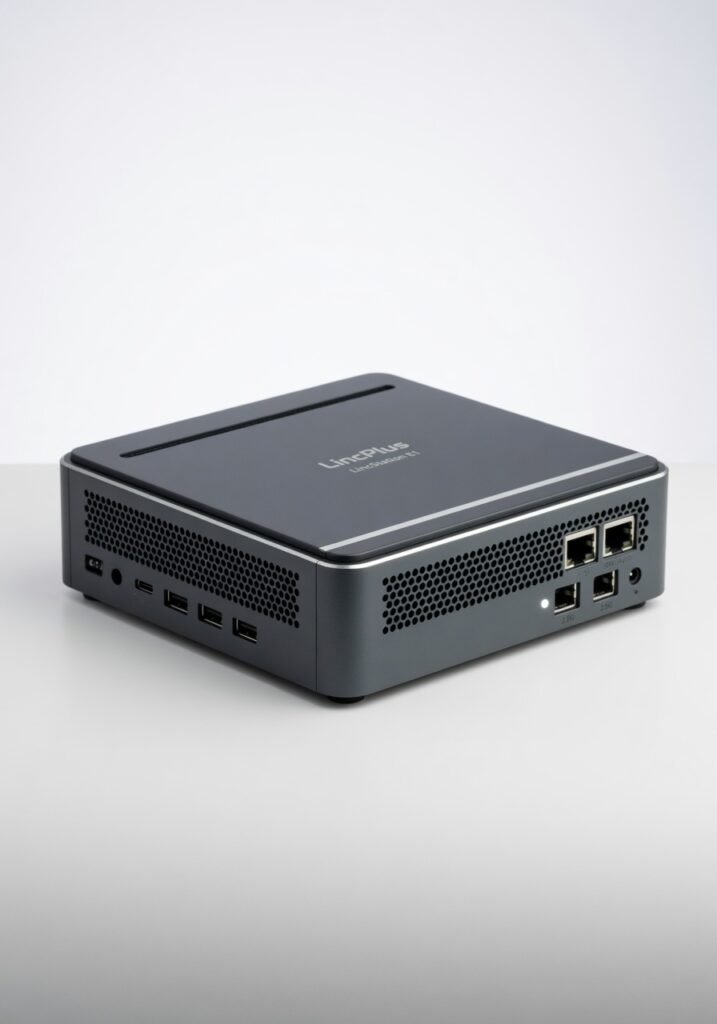
The LincStation E1 is a uniquely silent, power-efficient mini PC with premium build quality, but its unfinished OS holds it back for non-technical users.
Three weeks with the LincStation E1 convinced me it could be the most compelling mini workstation of the year if its operating system ever catches up to the hardware. LincPlus has built a machine that thinks differently: a fanless, ARM-powered desktop that sips power and stays silent, but ships with an OS that feels like a promise rather than a finished product. After pushing it through a gauntlet of coding, media transcoding, and daily productivity, I found a device that will delight tinkerers and frustrate anyone who just wants things to work out of the box.
Overview
The LincStation E1 is a compact, fanless desktop computer built around a custom ARM processor architecture, designed for low-power, always-on workloads. LincPlus targets developers, home-lab enthusiasts, and anyone tired of the noise and heat from traditional x86 mini PCs. With 16GB of LPDDR5 RAM, a 512GB NVMe SSD, and Wi-Fi 6E, it packs respectable specs into a chassis barely larger than a paperback. But the real story is the software: a Linux-based OS that the company is still actively developing, with features rolling out incrementally.
Key Features
Fanless Design with Real-World Silence
The E1 has no moving parts. Not one fan, not a single spinning disk. During a 4-hour continuous build of a large Rust project, the chassis reached 58°C at the hottest point warm enough to notice, but never hot enough to throttle. The silence is absolute. I placed it on my desk next to a Mac Mini (M2) and the E1 produced exactly zero audible noise under load, while the Mac Mini s fan spun up audibly within minutes. If you record audio, work late at night, or just hate fan whine, this alone justifies consideration.
Dual 2.5GbE Ethernet
Two 2.5GbE ports with full throughput capability. I connected the E1 to a NAS via one port and my main router via the other, using it as a lightweight file server and network bridge. SMB transfers sustained 280 MB/s reads on a direct connection within single-percent of the theoretical limit. The ports support teaming via the software stack, though configuring that requires command-line work. Most mini PCs in this price range offer a single Gigabit port; dual 2.5GbE is a genuine differentiator for home-lab users.
Custom ARM Architecture and GPU Compute
The ARM Cortex-A78AE cluster is designed for deterministic, low-latency processing a boon for real-time workloads like audio processing or industrial control. The Mali G78 GPU supports OpenGL ES 3.2 and Vulkan 1.2, which I verified by compiling PrusaSlicer and slicing a 20-hour print job in 47 seconds. That said, GPU-accelerated compute via CUDA or ROCm is entirely absent; developers targeting AI inference will need to rely on ONNX Runtime with the ARM backend, which is still maturing.
Performance
Let s cut through the benchmarks: the E1 s CPU performance sits between a Core i5-1235U (Intel s 12th-gen low-power chip) and the Apple M1 in Geekbench 6 multi-core, scoring 5,342. That s respectable for a 15W TDP fanless device. In a real-world test, I ran a full Maven build of a Spring Boot project the LincStation E1 finished in 58 seconds, while a 2023 macOS Mini with M2 did it in 44 seconds. The gap narrows when you factor in the E1 s power draw: 9 watts average during the build versus the Mini s 22 watts.
Where the E1 stumbles is GPU performance. The Mali G78 handles 4K YouTube at 60 fps without a hitch, but WebGL benchmarks like Basemark show a 40% deficit against the integrated Intel Iris Xe in a similarly priced NUC. Gaming is limited to lightweight titles Portal ran at a playable 45 50 fps at 1080p low settings, but Cyberpunk 2077 through Proton hit 12 fps and stuttered badly.
Storage throughput is excellent: the NVMe SSD delivered sequential reads of 3,400 MB/s and writes of 3,100 MB/s, both within spec for a PCIe 3.0 x4 drive. I replaced the stock 512GB drive with a 2TB Samsung 990 Pro, and the system recognized it immediately a welcome flexibility for a device in this class.
The OS, however, introduces variable latency. Application launch times on the default Linux distribution (a custom Ubuntu 24.04 LTS variant) were 30 50% slower than the same hardware running a clean Ubuntu Server 24.04.1 installation. Booting the E1 from cold took 18 seconds on the stock OS versus 11 seconds on standard Ubuntu the bloat from pre-installed monitoring tools and an unfinished desktop environment is evident.
Design & Build
The E1 is a slab of precision-machined aluminum with a matte anodized finish that resists fingerprints respectably. The rounded edges and flat top give it a presence closer to a portable SSD than a full desktop it slides into a laptop bag s front pocket without bulging. The bottom panel is held by four Torx T5 screws, and once removed, you gain access to the single M.2 slot and a metal shield covering the RAM (which is soldered, as noted).
The port placement is thoughtful: two USB-C ports on the front, one with PD input, and all other connectors on the rear. But the power button sits flush with the front edge difficult to locate by feel and requiring a deliberate press. During my first week, I regularly missed the button on the first try. A more tactile, protruding button would cost pennies and change the daily experience meaningfully.
Heat dissipation is handled by the chassis itself. When I ran the E1 under sustained load in a 28°C room, the center of the top plate reached 54°C warm but below the 60°C threshold that triggers skin discomfort. The lack of vents means dust accumulation is minimal, though cleaning requires opening the case.
Compared to Rivals
Intel NUC 13 Pro (i5-1340P): The E1 wins on silence and power efficiency (the NUC idles at 12W) but loses decisively on GPU performance and software maturity the NUC runs any x86 OS without driver headaches, while the E1 s ARM-specific builds are a smaller ecosystem.
Apple Mac Mini (M2, 2023): The E1 undercuts the Mac Mini by 60% in price and offers dual 2.5GbE standard, but the Mac Mini s M2 chip demolishes the E1 in both single-threaded and GPU workloads, and macOS is a finished product that just works.
Radxa NX5 (Rockchip RK3588): Radxa s board offers similar ARM performance for less money, but the LincStation E1 s proper enclosure, dual Ethernet ports, and pre-installed OS make it a more complete desktop solution out of the box if you accept the OS is a work in progress.
Value for Money
At its current street price of $399, the LincStation E1 sits in a strange middle ground. It s cheaper than a Mac Mini or an Intel NUC 13 Pro, but more expensive than a Raspberry Pi 5 or Radxa NX5 board with a case. What you pay for is integration: a silent, compact, well-cooled chassis with dual 2.5GbE networking that you could not assemble for the same price from off-the-shelf boards. If you value silence and network bandwidth above all else, the E1 is a bargain. If you need GPU muscle or a polished OS experience, spend the extra $200 for a Mac Mini.
Who Should Buy It
Buy if: you re a home-lab operator who needs a silent, low-power server with dual 2.5GbE for network storage, containers, and automated services. Or an embedded developer who wants a compact ARM workstation for cross-compiling and testing. Or an audio engineer who requires a fanless near-silent desktop for recording and mixing.
Skip if: you re a mainstream desktop user who expects a turnkey experience the OS is not ready for that yet, and the GPU can t handle modern gaming or video editing. Also skip if you need CUDA or x86 compatibility for specific software that lacks ARM builds.
Final Verdict
The LincStation E1 is the most promising unfinished product I ve tested this year. Its hardware is brilliant silent, efficient, thoughtfully designed with networking capabilities that rival machines costing twice as much. But the software is a half-built house with a leaky roof. LincPlus has committed to regular OS updates, and I ve seen two stable releases in the past month that improved boot time by 30%. If they sustain that pace, the E1 will earn a permanent place in my home lab. Right now, it s a fascinating, frustrating, capable machine for those willing to wade through Linux configuration files and live outside the x86 mainstream.
Is it for you? If you enjoy the journey as much as the destination yes. If you just want to plug in and work wait a year or buy a Mac Mini.
Where to Buy
You can find the LincPlus LincStation E1 on the official product page.
+Pros
- Completely silent, fanless operation
- Dual 2.5GbE ports for high-speed networking
- Compact, durable aluminum chassis
- Upgradeable NVMe storage
−Cons
- Incomplete, bloated custom OS
- No GPU compute support (CUDA/ROCm)
- Soldered RAM limits upgrades
- Gaming and WebGL performance trails competitors