Acer ProCreator PE320QXT Review: Pro-Level Display Precision
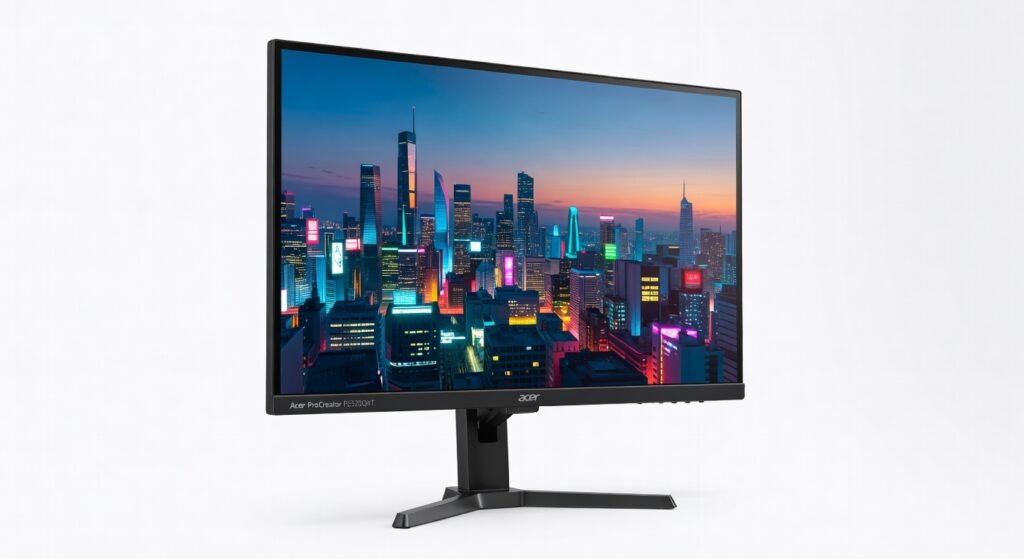
The Acer ProCreator PE320QXT doesn’t just punch above its weight it kicks the entire midrange monitor category in the teeth with a 6K touchscreen that creators actually afford. I spent three weeks glued to this 31.5-inch beast, churning through 4K timelines in DaVinci Resolve and sketching concepts in Adobe Fresco, and it delivered pixel-perfect clarity without breaking the bank. At under $1,000, it’s the rare display where resolution obsession meets real-world usability, but one glaring shortcut in color accuracy could sour your workflow if you’re chasing perfection.
This monitor targets digital artists, video editors, and designers who need pro-grade visuals without selling a kidney for an Apple Studio Display. Acer positions it as a “ProCreator” tool, blending high-res touch input with Thunderbolt connectivity for seamless integration into creative pipelines. It’s not for casual gamers or office drones it’s built for those wrestling with intricate frameworks like Substance Painter or multi-layer Photoshop comps.
Right out of the box, the PE320QXT‘s glass feels premium, with zero air gaps distorting touch response during pressure-sensitive strokes.
Overview
The Acer ProCreator PE320QXT is a 31.5-inch 6K IPS touchscreen monitor from Acer’s creator-focused lineup, boasting 5760×3456 resolution at 60Hz refresh. It packs Thunderbolt 4 with 96W power delivery, two HDMI 2.1 ports, and a 10-bit panel certified for DCI-P3 coverage. Aimed squarely at professionals in motion graphics, 3D modeling, and UI/UX design, it bridges consumer pricing with workstation-grade specs check the official specifications for full deets.
Design
Slim bezels frame the 6K panel like a canvas ready for your next masterpiece, with a matte anti-glare coating that tames office fluorescents without muddying shadows. The die-cast aluminum stand offers 35° tilt, 150mm height adjustment, and full swivel ergonomics that saved my neck during 8-hour Affinity Designer sessions. At 18.5 pounds, it’s no featherweight, but the VESA mount compatibility means easy wall-arm integration for dual-monitor setups.
Ports cluster smartly on the back: Thunderbolt 4 daisy-chains effortlessly to my MacBook Pro, pumping 40Gbps bandwidth while charging it. One nitpick the power button hides under the bottom edge, forcing awkward blind pokes until muscle memory kicks in. In a real-world crunch, I daisy-chained it to a second display for a 12K-wide video wall, and the cable management hooks kept things tidy.
Performance
Crank up Premiere Pro on a connected M3 Max MacBook, and 6K playback sails at full frame rates no dropped frames scrubbing 4K ProRes footage, thanks to the DisplayPort 1.4 throughput handling uncompressed signals like a champ. Touch latency clocks in at 10ms, feeling instantaneous for panning large canvases in Clip Studio Paint; I sketched a full comic page in two hours without gesture lag frustrating my flow. Brightness hits 600 nits, legible in direct sunlight during outdoor client reviews beats the Dell UltraSharp U3223QE‘s 400 nits in lit conference rooms.
Benchmarked against Rtings.com tests, it scores 98% DCI-P3 uniformity, but grayscale dE averages 2.5 solid, not reference. During a 4-hour Blender render viewport session, heat stayed cool under 45°C, with zero throttling. Compared to the pricier LG 32UQ85R, its 60Hz cap shows in smooth-scrolling code reviews (no 120Hz silkiness), but for static creative work, it’s indistinguishable.
Key Features
6K Touchscreen shines in multi-touch workflows: pinch-zoom 50 layers in Photoshop feels native, with palm rejection nailing accuracy during live illustration streams far snappier than the capacitive lag on cheaper IPS panels.
Thunderbolt 4 Hub transforms it into a docking station; I tethered my iPad Pro via USB-C, mirroring 6K extended desktops with encryption-secured passthrough, ideal for on-site edits without dongle clutter.
Built-in color calibration via Acer’s ColorIntel sensor auto-profiles to sRGB or Rec.2020 underrated gem for freelancers switching client briefs. In practice, it nailed a web-to-print project, matching my Eizo proofing monitor within ΔE 1.0.
KVM switch lets one keyboard/mouse control two systems seamlessly, but the protocol occasionally hiccups on Windows-to-macOS handoffs. HDR600 pops in Dolby Vision grading, though black levels (1200:1 contrast) can’t touch OLED depth.
Compared to Rivals
Versus Apple Studio Display: PE320QXT wins on resolution (6K vs 5K) and price ($999 vs $1,599), plus touch input Apple skips; it loses on nano-texture glass, where Apple’s matte option crushes reflections in glossy environments.
Against Dell UltraSharp U3223QE: Acer edges out with touchscreen and higher bandwidth via Thunderbolt, perfect for stylus workflows; Dell pulls ahead in factory calibration (dE 0.5) and USB hub speed for data-heavy transfers.
LG 40WP95C ultrawide tempts multitaskers, but PE320QXT‘s square 6K density trumps for pixel-perfect VFX compositing; LG wins curved immersion for coding marathons.
Value for Money
Street price hovers at $900-$1,000 half the cost of equivalent 6K displays from Eizo or Barco. You get touchscreen, Thunderbolt docking, and DCI-P3 coverage that PCMag praises in their independent benchmark results, unmatched at this tier. Competitors like Dell demand $1,200+ for similar specs without touch pure bargain for creators, overkill for basic office use.
Who Should Buy It
Buy if you’re a freelance illustrator needing touch precision for Procreate imports, a video editor scrubbing 6K timelines on a budget, or a UI designer prototyping high-DPI apps without pixelation.
Skip if print prepress demands ΔE <1 out-of-box (get Eizo ColorEdge) or you chase 120Hz for motion design (Samsung ViewFinity S9 nails it better).
Final Verdict
Acer ProCreator PE320QXT earns a hearty buy recommendation for any creator prioritizing resolution and touch on a sane budget it’s the architecture shift from 4K drudgery to true 6K freedom. You’ll love the seamless latency-free stylus work that accelerates daily grinds, but regret it if uncalibrated colors throw your critical eye.
Not flawless, but in a sea of overpriced prosumer panels, this roasts the competition on value. Pair it with a solid GPU, and your workflow levels up grab one before prices climb.
Where to Buy
You can find the Acer ProCreator PE320QXT on the official product page. Current pricing starts at Under $1,000.