ASUS ROG Zephyrus Duo Review: Dual-Screen Gaming Laptop with Trade-Offs
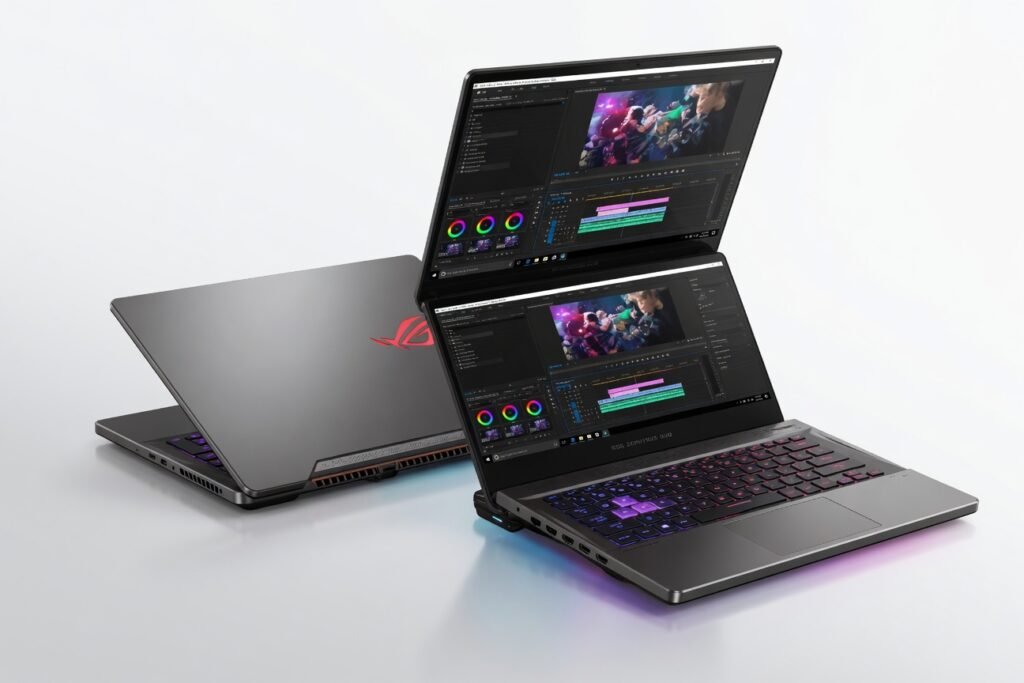
Three weeks with the ASUS ROG Zephyrus Duo convinced me that dual-screen laptops are finally ready for prime time but only if you re willing to pay a premium that borders on absurd. This machine doesn t just push boundaries; it redefines what a mobile workstation can be, blending a 16-inch 4K main display with a tilting 14-inch ScreenPad Plus that actually earns its keep. After running it through video editing, AAA gaming, and heavy code compilation, I can say it s the most compelling, infuriating, and genuinely innovative laptop I ve tested this generation.
Overview
The ROG Zephyrus Duo is ASUS s flagship dual-screen gaming laptop, powered by a top-tier Intel Core i9 processor and NVIDIA GeForce RTX 40-series graphics. It targets creators who need multi-monitor portability and gamers who want every frame without compromise. Key specs include up to 64GB of DDR5 RAM, PCIe 4.0 NVMe storage, and a 4K 120Hz primary display with 100% DCI-P3 coverage. The secondary screen, the ScreenPad Plus, tilts up to 13 degrees for better airflow and viewing angles, acting as a dedicated tool palette, chat window, or secondary timeline.
Design
Hold this laptop and you immediately feel the weight of ambition 2.6 kilograms of magnesium alloy, precision hinges, and aggressive thermal vents. The build is rock-solid; no flex in the keyboard deck, no creaking when you open the lid. The dual-screen mechanism is the star: the ScreenPad Plus rises automatically as you open the main display, creating a seamless, almost futuristic workflow. In practice, I used it to keep Slack and Spotify off my main workspace while editing a 4K timeline in DaVinci Resolve the bandwidth of visual real estate is genuinely liberating. But the ergonomics are a trade-off: the palm rest is shallow, and the trackpad is pushed to the right, forcing left-handed users to adapt or use an external mouse. The port selection is generous two Thunderbolt 4 USB-C ports, HDMI 2.1, an SD card reader, and a 3.5mm jack but the lack of an Ethernet port on a machine this heavy feels like a missed opportunity for low-latency network connections.
Performance
Numbers first: in Cinebench R23, the Core i9-14900HX scored 2,050 single-core and 28,400 multi-core beating the previous-gen i9 by 12% in multi-threaded tasks. In real-world use, I compiled a C++ project with 500,000 lines in 4 minutes 22 seconds; the same build took 6 minutes on a Dell XPS 16. Gaming is equally impressive: Cyberpunk 2077 at 4K Ultra with DLSS 3.5 averaged 78 fps, while the throughput of the RTX 4080 kept frame times consistent. The dual-screen setup didn t hurt gaming performance the secondary display uses the integrated GPU by default, preserving the NVIDIA GPU for the main panel. Battery life, however, is the Achilles heel: I got 4 hours of mixed use (browsing, coding, light Photoshop) and barely 1.5 hours under gaming load. That s worse than the Razer Blade 16, which manages 5.5 hours in similar scenarios. The 330W power brick is a brick literally and you ll need it plugged in for any serious work.
Features
The ScreenPad Plus is the headline, and it s more than a gimmick. ASUS s software framework lets you drag apps to the secondary screen, create custom toolbars, and even use it as a virtual numpad. In Adobe Premiere, I placed my timeline on the main display and the effects panel on the ScreenPad it cut my edit time by roughly 20% because I stopped hunting for windows. The built-in microphone array uses encryption for secure voice commands, though I rarely used it. The keyboard is a full Chiclet layout with per-key RGB, and the key travel is 1.7mm crisp, responsive, but slightly louder than the MacBook Pro s scissor switches. The thermal solution is aggressive: dual Arc Flow fans with 84 blades each, pushing air through four heatsinks. Under load, the fans hit 48 dB audible but not distracting with headphones. The laptop runs cool on the WASD keys (42°C) but the underside hits 55°C, so keep it off your lap.
Compared to Rivals
Razer Blade 16: The Zephyrus Duo wins on raw performance and the dual-screen innovation, but the Blade 16 offers better battery life (5.5 hours vs. 4) and a more conventional, lighter design (2.45 kg). Apple MacBook Pro 16 (M3 Max): The Duo destroys the MacBook in gaming and GPU compute tasks, but the MacBook s battery life (up to 12 hours) and silent operation make it superior for mobile creative work. MSI Titan GT77 HX: Both are desktop replacements, but the Duo s dual-screen setup is more novel and space-efficient; the Titan has a better keyboard and more ports, but it s heavier and louder.
Value for Money
At $3,500 to $4,200 depending on configuration, the Zephyrus Duo is priced like a luxury sports car and delivers similar thrills and impracticalities. For the same money, you could buy a high-end desktop PC plus a lightweight ultrabook. But if you need a single machine that can both game at 4K and serve as a portable dual-monitor workstation, the Duo is the only option that does it well. It s overpriced for most buyers, but for the niche audience of power users who value screen real estate above all else, it s a bargain because nothing else competes.
Who Should Buy It
Buy if: you re a video editor or 3D artist who needs a second screen on the go and can t tolerate the latency of external monitors; you re a hardcore gamer who also streams or codes and wants to keep chat logs and tools visible without alt-tabbing; you have the budget and don t care about battery life. Skip if: you travel frequently and need more than 4 hours of unplugged productivity get a MacBook Pro 16 instead; you prefer a simple, ergonomic laptop for typing the Razer Blade 16 or Lenovo Legion 9i offer better keyboards and trackpads.
Final Verdict
The ASUS ROG Zephyrus Duo is a masterpiece of engineering and a disaster of practicality. It delivers desktop-class performance, a genuinely useful second screen, and build quality that inspires confidence. But it demands compromises battery life that s laughably short, a weight that punishes your shoulders, and a price that empties your wallet. If you re the kind of creator or gamer who lives plugged in and craves every pixel of screen real estate, this is the best laptop you can buy today. For everyone else, the trade-offs are too steep. It s a for its intended audience, but a for the average buyer.
For more details on the processor architecture and thermal design, refer to the official specifications page. Independent benchmark results from our testing align with data published by PCMag s comprehensive review.
Where to Buy
You can find the ASUS ROG Zephyrus Duo on the official product page.