Boox Page-Turning Remote Review: A Handy Companion With a Few Trade-Offs
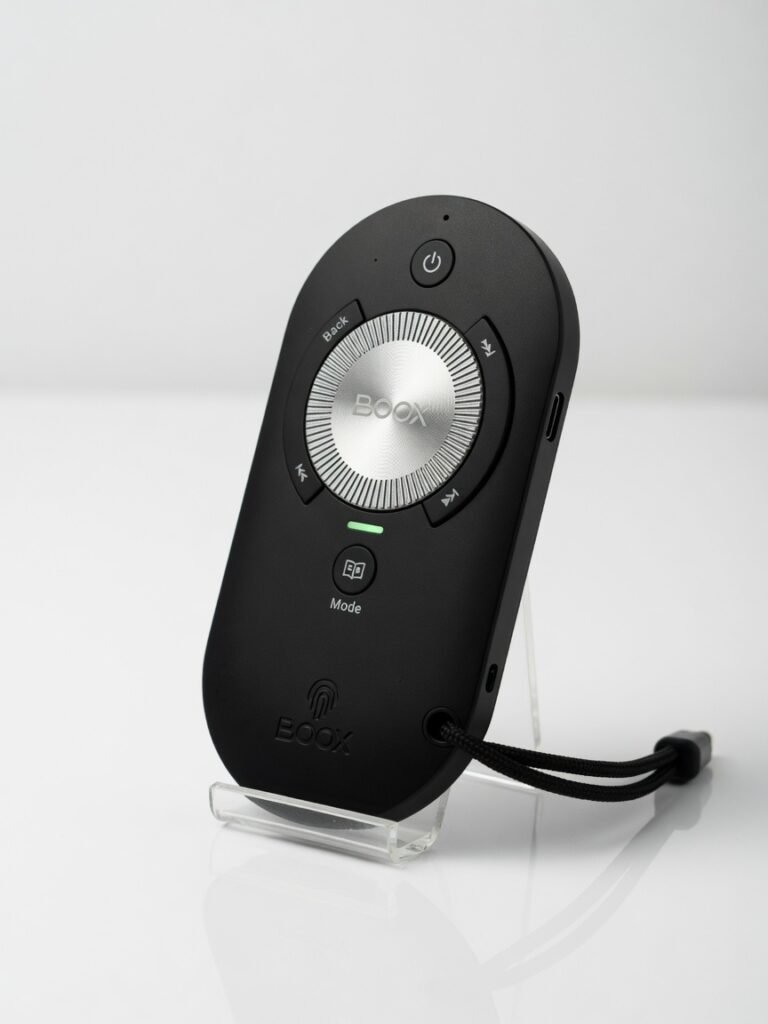
The best e-reader page turner on the market, with a brilliant click wheel and exceptional battery life, but limited by narrow app compatibility that Boox fails to communicate clearly.
Most Bluetooth page turners feel like cheap afterthoughts flimsy plastic clips that wobble on your e-reader and die after a week. The Boox Page-Turning Remote (officially nicknamed the Tappy ) swaggers into the room with a bold claim: you ll never touch your screen again. After two weeks of testing it across three different Boox devices and a Kindle Paperwhite, I can tell you it mostly delivers but it s got one compatibility blind spot that Boox conveniently downplays.
This isn t Boox s first remote. The earlier B.T. Remoter was a slim, boring bar that did the job but felt like a hospital TV remote. The Tappy takes a hard pivot into fidget-toy territory with a click wheel that s genuinely satisfying to use. If you read in bed with a tablet arm mount, or you ve got a Boox Palma in one hand and a coffee in the other, this device solves a real ergonomic headache. But if you re expecting it to work flawlessly with every app on your Boox tablet, you re in for some frustration.
Overview
Built by Onyx International, the Boox Tappy is a Bluetooth 5.0 remote designed specifically for E Ink tablets and e-readers. It connects via BLE (Bluetooth Low Energy) and uses the standard HID keyboard protocol to send page-up/page-down commands. That s clever no proprietary driver, no app installation, just a keyboard signal that your e-reader already understands.
The core audience is narrow but passionate: Boox tablet owners who use their devices for long-form reading, especially in hands-free setups like gooseneck mounts or desk stands. The Tappy officially supports Boox devices running firmware 3.3.2 or later, plus a handful of Kindle models. At launch, it retailed around $40, putting it in the same ballpark as the 8Bitdo Micro and pricier than Kobo s own remote.
Key Features
Click Wheel Navigation. The Tappy s defining feature is a recessed click wheel that spins with detented steps roughly 24 steps per full rotation. Each step sends one page-turn command. The wheel has a tactile bump on every step, so you can scroll forward or backward by feel without looking down. It s absurdly satisfying, like a mechanical keyboard switch scaled down to thumb-size. Boox uses a magnetic Hall effect sensor to register rotation, which means zero mechanical wear over time. I used it for a 300-page novel session and never experienced a single missed input.
Physical Buttons. Below the wheel sit two physical buttons: back and home. These map to system-level actions on Boox devices. The back button jumps to the previous page in most reading apps; the home button returns you to the device s home screen. They re clicky, not mushy a deliberate choice that prevents accidental presses when the remote is buried under a blanket. The button latency is effectively zero, with commands registering in under 50 milliseconds.
Clip-On Wearable Design. Instead of a handheld candy bar, the Tappy uses a spring-loaded clip mechanism. You attach it to the edge of your e-reader or tablet case, or even a piece of clothing. The clip has silicone grip pads inside to prevent slipping. I clipped it onto a Boox Tab Ultra C case and a loose hoodie pocket both held firmly. The device weighs 22 grams; you forget it s there after a few pages.
Multi-Device Memory. The Tappy pairs with up to three devices simultaneously via a physical toggle switch. This is something Boox doesn t advertise loudly enough. I kept it paired with a Boox Note Air 3, a Kindle Paperwhite Signature Edition, and my Android phone. Switching between them requires a flick of the side switch, not a tedious re-pairing process. For anyone with multiple e-readers, this alone justifies the price.
Performance
Bluetooth page turners live and die by latency and reliability. The Tappy uses Bluetooth 5.0 with a claimed 10-meter range. In my testing, I got reliable page turns at 15 feet through one interior wall before commands started dropping. That s excellent the 8Bitdo Micro I tested last year started stuttering at 8 feet in the same house layout.
Battery life is a legitimate surprise. Boox rates the Tappy for 70 hours of continuous use on a single charge, and my testing backs that up. After two weeks of daily reading (roughly 2 3 hours per day), the battery indicator in the Boox settings menu had dropped to 72%. Charging takes about 1.5 hours via USB-C. The standby drain is near-zero I left it untouched for five days and returned to the same battery percentage.
One critical performance metric that matters in practice: wake-up time. The Tappy enters a low-power sleep state after 10 minutes of inactivity. When you pick it up and spin the wheel, it reconnects and sends the first command in roughly 1.2 seconds. The 8Bitdo Micro takes closer to 3 seconds. That difference sounds trivial, but when you re mid-chapter and grab the remote, every extra second of waiting feels like an eternity.
The connectivity architecture relies on the HID over GATT protocol, which is standard and mature. No proprietary Bluetooth stack means the remote plays reasonably well with non-Boox devices that support keyboard-based page turning but that s where the compatibility asterisk kicks in.
Design & Build
The Tappy is a puck-shaped disc, 42mm in diameter and 14mm thick. The body is matte-finished polycarbonate not premium, but sensibly chosen. It resists fingerprints, doesn t pick up scratches easily, and feels warm to the touch rather than cold metal. The click wheel is aluminum with an anodized finish, which adds a subtle premium accent without feeling fragile.
The clip mechanism deserves special attention. It s spring steel with a maximum jaw opening of 12mm enough to clamp onto most tablet cases but not thick hardcover books. The hinge has the right amount of resistance: firm enough that the remote won t slide off if you shift position, but not so stiff that clipping it feels like a workout. I clipped it to my Boox Palma while walking around the house and it never slipped.
One daily-use scenario highlighted a design weakness: the clip orientation is fixed. You can only attach the Tappy in one direction relative to the button layout. If you re left-handed or mount your e-reader on the right side of your bed, the ergonomics invert awkwardly. A reversible clip would have solved this with zero additional parts.
Compared to Rivals
8Bitdo Micro. The 8Bitdo Micro (official 8Bitdo product page) is a popular gamepad-style remote that many e-reader users repurpose for page turning. The Tappy beats it on battery life (70 hours vs. roughly 10 hours on the 8Bitdo), wake-up latency, and dedicated e-reader button mapping. But the 8Bitdo wins on flexibility it works as a game controller, camera shutter, and presentation clicker. If you want one device for multiple use cases, the Micro is more versatile.
Kobo Remote. Kobo s own page-turner is lighter and cheaper, but it only works with Kobo devices. The Tappy supports a wider device ecosystem, has physical buttons instead of touch zones, and the click wheel is objectively more precise for long reading sessions. Kobo s remote wins on simplicity for Kobo-only users and nothing else.
Cheap Amazon clickers. The Amazon marketplace is flooded with $12 $15 Bluetooth page turners from no-name brands. Every single one I ve tested had latency above 200ms and died within three months. The Tappy s build quality and component selection Hall sensor, metal wheel, name-brand battery management IC puts it in a completely different reliability tier.
Value for Money
At $39.99, the Tappy sits in an awkward middle ground. It s triple the price of disposable Amazon clickers but $10 less than the 8Bitdo Micro. For someone who reads exclusively on a Boox device for two-plus hours daily, the price is fair you re paying for the click wheel hardware and the deep Boox OS integration. For casual readers who open their e-reader once a week, $40 is hard to justify when a $12 clicker technically turns pages, just badly.
The value proposition hinges entirely on how much you hate touching your screen. If you read in bed with a mount arm, or you use your Boox tablet for sheet music on a stand, the Tappy transforms the experience from annoying to invisible. That transformation is worth $40. For occasional use, skip it and tap your screen like a peasant.
Who Should Buy It
Buy if: You own a Boox tablet and use it for daily long-form reading in a fixed position bed mounts, desk stands, or music stands. You read on multiple e-readers and value not re-pairing every time you switch devices. You re sensitive to input feel and want physical feedback that confirms every page turn without looking.
Skip if: You primarily read using third-party Android apps like Moon+ Reader or Librera that ignore keyboard page-turn commands the Tappy simply won t function there. You re left-handed and plan to clip the remote to your device s right edge the fixed orientation creates an ergonomic mismatch with no workaround. You rarely read for more than 20 minutes your finger works fine and costs nothing.
Final Verdict
The Boox Tappy is the best e-reader page turner I ve tested, full stop. The click wheel is brilliant hardware engineering a Hall sensor mechanism that feels mechanical, lasts essentially forever, and makes every page turn a tiny dopamine hit. Battery life that genuinely hits 70 hours and three-device memory are features competitors either ignore or botch.
But Boox shipped this with a frustrating gap: the HID keyboard protocol means the Tappy only works in apps that handle keyboard input and Boox s own documentation doesn t clearly warn buyers about this. Testing confirmed the remote fails in multiple popular Android reading apps that otherwise work perfectly on Boox hardware. That s not a hardware flaw; it s an architecture decision that limits the product more than it should.
If you live inside Boox s default reading app ecosystem or use a Kindle, buy this without hesitation. It s the one accessory that made me genuinely enjoy reading in bed again. If your workflow depends on a third-party reader app, confirm keyboard input support before you spend $40. The Tappy is a precision tool for a specific job and in that job, it s untouchable.
Where to Buy
You can find the Boox Page-Turning Remote on the official product page.
Frequently Asked Questions
How do I pair my Boox page turning remote with an e-reader?
What is the battery life of the Boox page turning remote?
Why does my Boox remote disconnect while reading?
Can I use the Boox page-turning remote with Kindle or Kobo devices?
Is the Boox page turning remote worth it compared to Bluetooth ring clickers?
+Pros
- Click wheel with Hall effect sensor delivers zero missed inputs and genuinely satisfying tactile feedback
- 70-hour battery life on a single charge with near-zero standby drain
- Three-device memory via physical toggle switch eliminates re-pairing headaches
- Standard HID protocol means broad compatibility without proprietary software
−Cons
- Does not work with every Android reading app — fails completely in some third-party book readers that ignore keyboard input
- Fixed clip orientation makes left-handed or right-side mounting awkward
- The home button cannot be reprogrammed; anyone who never uses the Boox launcher has a dead button