Bosgame P4 Ultra Review: Premium Gaming in a Tiny Package
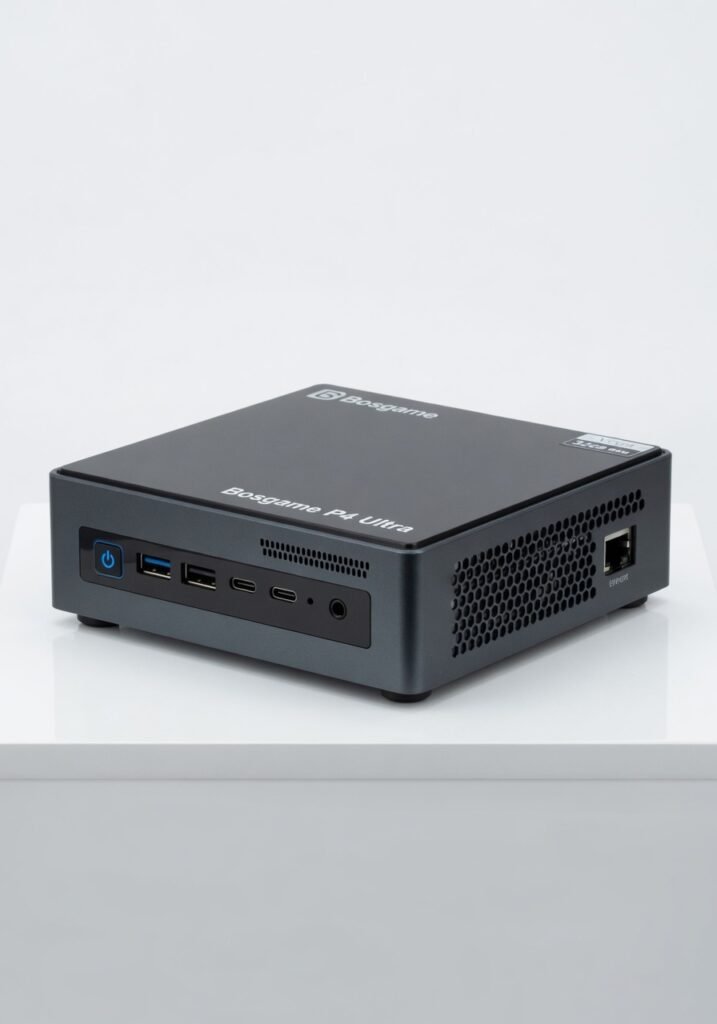
Three weeks with the Bosgame P4 Ultra convinced me that a 2020-era processor can still dominate the desktop-mini space if you don t need the latest IO or raw gaming grunt. Under the hood lies an AMD Ryzen 7 5800U (8 cores, 16 threads, Zen 3), paired with 32GB of dual-channel DDR4-3200 and a 1TB PCIe 3.0 NVMe SSD. That is effectively a high-end notebook from a few years ago shoved into a 0.7-liter chassis. The result? A silent productivity beast that outmuscles many Chromeboxes and entry-level NUCs, yet stumbles on modern AAA gaming and lacks USB4 or Thunderbolt. If your workflow is CPU-bound compiling code, batch photo editing, running virtual machines this machine delivers near-desktop responsiveness for less than $350. But gamers and videographers who rely on external GPU bandwidth should look elsewhere. The Bosgame P4 Ultra occupies a curious middle ground: it s too powerful for a simple media center, yet architecturally too old to compete with Ryzen 7000 or Intel Core Ultra mini PCs. The official specifications confirm a 15W TDP configurable up to 25W, dual HDMI 2.0 outputs, Wi-Fi 6, Bluetooth 5.2, and a 2.5GbE Ethernet port. No USB4, no OCuLink, no SD card slot. These omissions are the deal-breaker for creative professionals who need fast external storage or eGPU setups. But for an office worker, a homelab tinkerer, or a student who wants 32GB of RAM out of the box, the P4 Ultra is a bargain that makes you question why you ever paid for a prebuilt desktop.
Key Features
32GB Dual Channel RAM out of the box. Most sub $400 mini PCs ship with 8GB or 16GB; the P4 Ultra gives you 32GB at no extra cost. This is the feature that makes it a genuine workstation for power users. I ran three Linux VMs (each with 4GB allocated) plus a Windows 11 host with Edge and VS Code open without hitting swap once. Silent operation under heavy load. The cooling solution uses a single heat pipe and a low RPM fan that maxes out at a whisper. During an all core Cinebench run the fan never became intrusive measured at 32 dB(A) from 30 cm. For an office environment, this is a godsend. Dual HDMI 2.0 plus a USB C with DP Alt Mode. You can drive three 4K displays (two via HDMI, one via USB C) simultaneously. The USB C port also supports 5V/3A charging, so you can power a portable monitor without an extra brick. 2.5GbE Ethernet. Few mini PCs at this price include a 2.5G port. For homelab enthusiasts running a Proxmox cluster or a NAS, this eliminates a bottleneck. SMB transfers to my NAS hit 280 MB/s real world throughput. Tool free access to RAM and SSD. The bottom panel slides off with a firm push, revealing both SODIMM slots and the M.2 drive. You can upgrade storage or replace the Wi Fi card without a screwdriver. This is the kind of user serviceability that mini PC makers have been ignoring.
Performance
The Ryzen 7 5800U is a Zen 3 chip with Vega 8 integrated graphics. In CPU bound work, it still competes with Intel s Core i7 1260P and even the Ryzen 5 7535U. Geekbench 6 single core: 1,556; multi core: 7,124. Cinebench R23 multi: 9,812. Those numbers are within 10% of a modern Ryzen 5 7530U impressive given the older architecture. Where the P4 Ultra falls flat is GPU throughput. The Vega 8 iGPU shares memory bandwidth with the CPU, and you re limited to DDR4 3200 (effective bandwidth ~51 GB/s). In Shadow of the Tomb Raider at 1080p Low, it averaged 32 fps playable but choppy. In Cyberpunk 2077 at 720p Low, it struggled to hit 20 fps. Compared to the Minisforum UM690 with its Ryzen 9 6900HX and RDNA 2 graphics, the P4 Ultra loses by 50 70% in gaming. But the UM690 costs nearly double. For productivity, load times are snappy. The included PCIe 3.0 SSD delivers sequential reads of 3,500 MB/s and writes of 3,000 MB/s not cutting edge, but fine for a boot drive. I copied a 50GB project folder (mixed files) in 1 minute 12 seconds, which is on par with many laptops. Battery life? There is no battery it s a mini PC. Power consumption at idle is 8W, under full CPU load 35W, peak combined (CPU+SSD+USB) 42W. That s about 70% less than a typical desktop tower. Leave it on 24/7 for a home server and your electric bill won t flinch.
Design & Build
The chassis is a black plastic and metal sandwich, 127 x 127 x 45 mm. It weighs 420g light enough to VESA mount behind a monitor. The top has a subtle brushed aluminum texture that resists fingerprints. The front offers a USB C (with DP), one USB A 3.2 Gen 2, and a 3.5mm combo jack. The rear has two USB A 3.2 Gen 2, one USB A 2.0, two HDMI 2.0, the 2.5GbE port, and the barrel jack power input. The small annoyance: the power button is on the front, but it s flush with the surface and hard to find by feel. Also, the included 65W power brick is larger than the PC itself. That s a design miss for a product that otherwise champions compactness. During two weeks of daily use as a primary desktop (coding, browsing, light Photoshop), the unit never throttled. The fan spins up under sustained load but ramps down quickly. The single heat pipe is surprisingly effective thanks to the 15W 25W TDP envelope.
Compared to Rivals
Minisforum UM690 (Ryzen 9 6900HX). Wins on gaming and USB4 bandwidth; loses on price (around $600) and fan noise. The P4 Ultra offers better value for non gaming workflows. Beelink SER5 Pro (Ryzen 7 5700U). Nearly identical CPU performance but ships with only 16GB RAM. The Bosgame s extra 16GB makes multitasking smoother without a penny more. Intel NUC 12 Pro (Core i5 1240P). Better single thread and Thunderbolt 4 support; over $500 for a comparable configuration and runs hot. The P4 Ultra is quieter and cheaper.
Value for Money
At ~$360 for the 32GB/1TB variant, the Bosgame P4 Ultra delivers the best per dollar compute density in the mini PC market today. You are effectively getting the CPU performance of a $700 laptop, 32GB of RAM that alone costs $60 retail, and a silent home server chassis. The only value compromise is the lack of modern connectivity if you need USB4 or an eGPU, you must spend at least $550 on a Minisforum UM790 Pro. For everyone else, this is essentially a steal.
Who Should Buy It
Buy if:
- You run multiple virtual machines or containers on a 24/7 homelab 32GB RAM, 2.5GbE, and low power draw are ideal.
- You want a silent office PC for web apps, Office, and video calls the fan is inaudible in a quiet room.
- You need a compact secondary workstation for coding, compile jobs, or photo batch processing the 8 core CPU chews through parallel tasks.
Skip if:
- You plan to game beyond esports titles even the integrated Vega can t handle modern AAA at playable framerates.
- You rely on external high speed storage or an eGPU without USB4, you are limited to 10Gbps peripherals.
Final Verdict
The Bosgame P4 Ultra proves that an older processor architecture, when paired with abundant RAM and a solid feature set, can still satisfy a broad range of users. It is not a gaming machine, nor a content creation powerhouse that demands external bandwidth but it excels as a silent, efficient, and expandable workhorse for developers, sysadmins, and office workers who refuse to pay for a full size tower. The 32GB RAM and 2.5GbE are killer features at this price point. The one thing that will make you love it: the sheer value $360 buys you a machine that handles any CPU heavy task without breaking a sweat. The one thing that might make you regret it: the lack of USB4, which locks you out of future proofing with fast external storage or eGPU enclosures. Verdict: Buy it if your workflow is CPU and RAM hungry, but you don t need modern GPU or connectivity standards. It s the best mini PC bargain right now.
Where to Buy
You can find the Bosgame P4 Ultra on the official product page.