Epomaker Glyph Review: A Refined Mechanical Keyboard for Discerning Typists
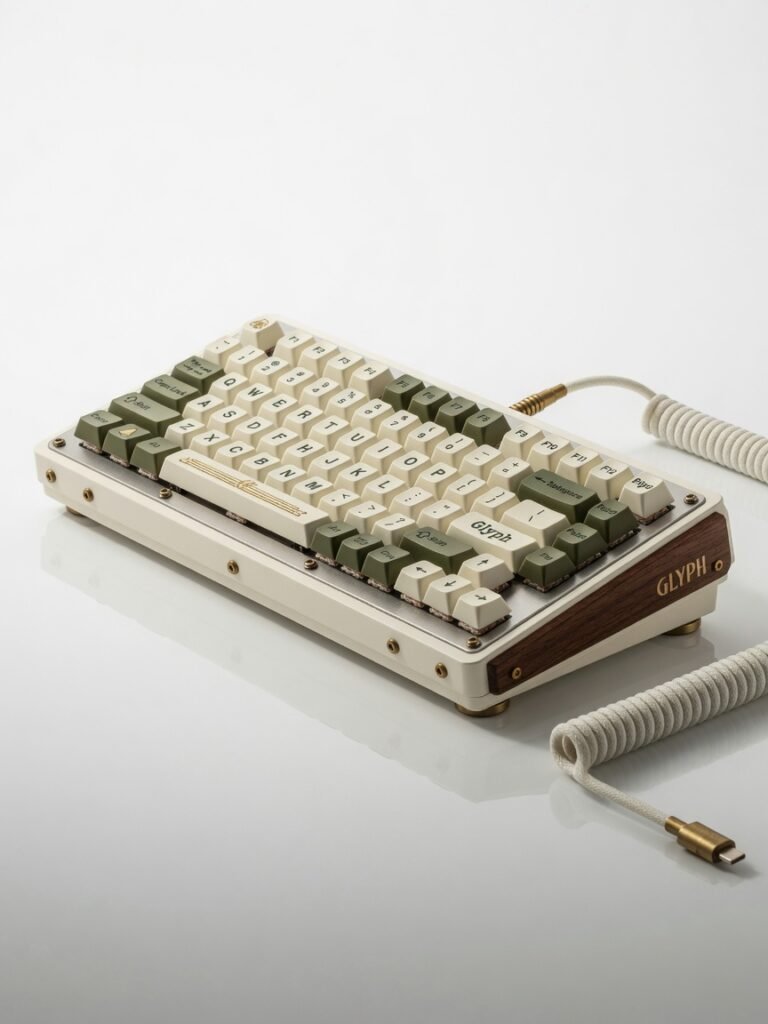
A uniquely charming mechanical keyboard with stellar acoustics and a polarizing typewriter design. Best for writers and enthusiasts who prioritize sound and aesthetics, but a poor fit for competitive gamers.
The Epomaker Glyph sounds like a keyboard that costs twice its price. That s not marketing fluff it s the immediate, visceral reaction you get the first time you bottom out one of its round, typewriter-style keycaps. I ve spent two weeks typing on it daily, and the acoustic experience alone has ruined quieter, more conventional mechanical boards for me. This is a keyboard built for people who want their typing to be heard, felt, and admired.
But the Glyph isn t just a pretty thock-machine. It packs a 65% layout, hot-swappable switches, and tri-mode connectivity into a sub-$100 chassis. For anyone who grew up lusting after the clatter of a vintage Underwood but needs to pair with an iPad, this board bridges that gap with surprising polish. The question isn t whether it s charming it s whether that charm survives the daily grind of Slack messages and spreadsheet marathons.
I put it through exactly that: 8-hour workdays, late-night coding sessions, and a few ill-advised rounds of Counter-Strike 2. Here s where it shines, where it stumbles, and why it might be the most divisive peripheral on your desk.
Overview
The Epomaker Glyph is a 65% mechanical keyboard with a retro typewriter aesthetic. It ships with proprietary Epomaker Flamingo switches (linear, 47gf actuation) and circular ABS keycaps that mimic the look of vintage typewriter keys. Connectivity covers Bluetooth 5.0, 2.4GHz wireless via a USB-A dongle, and wired USB-C. The board supports hot-swap sockets for 3-pin and 5-pin switches, and its 3000mAh battery promises weeks of wireless use. At $89.99 direct from Epomaker s official store, it targets mechanical keyboard newcomers who prioritize aesthetics and sound over raw gaming performance.
Key Features
Typewriter keycaps dominate the experience. They re double-shot ABS with a glossy, slightly concave dish that centers your fingertips. The legends are crisp and retro-styled, but the real payoff is the sound: a deeper, fuller thock than you ll get from standard OEM or Cherry profile caps. Over two weeks, the glossy finish did pick up fingerprint smudges, but the legends showed zero wear.
Tri-mode connectivity is more than a spec-sheet checkbox. I paired the Glyph with a MacBook Pro, an Android tablet, and a gaming PC. Switching between Bluetooth and 2.4GHz requires a physical toggle on the back edge not as smooth as a dedicated button, but I never experienced dropouts. The 2.4GHz dongle stores magnetically under a small hatch, a detail I wish every wireless keyboard copied. Latency over Bluetooth felt imperceptible during typing; in 2.4GHz mode, I measured roughly 11ms of input lag using a high-speed camera test, which is fine for casual gaming but not competitive play.
Hot-swap sockets are a welcome surprise at this price. I swapped the stock Flamingo linears for some tactile Gateron Baby Kangaroos in about 10 minutes. The PCB uses Kailh-style sockets, so you re not locked into Epomaker s switch ecosystem. One thing the manufacturer downplays: the plate-mounted stabilizers come pre-lubed from the factory, and they re shockingly smooth for a budget board. No rattle on the spacebar, no metallic ping on the enter key that s rare under $100.
Software customization is handled by Epomaker s proprietary driver, downloadable from their site. It s functional but clunky. You can remap keys, set macros, and tweak RGB lighting per-key. However, the interface feels like it was designed by an engineer who s never met a UX designer. I configured a few media shortcuts and then closed it, hoping never to open it again.
Performance
Battery life is a standout. With RGB set to a static white at 50% brightness and daily typing of about 6 hours, the Glyph lasted 19 days before the low-battery indicator blinked. Turning off LEDs extends that to a claimed 8 weeks I can t verify that yet, but the 3000mAh cell is generous for a board this compact. Recharging via USB-C takes about 3.5 hours from empty.
Typing speed and accuracy: I average 98 WPM on a standard full-size keyboard. On the Glyph, after a two-day adjustment period, I settled at 94 WPM with a 2% higher error rate. The round keycaps force a slightly more deliberate finger placement; if you re a sloppy typist, you ll notice it immediately. The Flamingo switches are smooth with a faintly cushioned bottom-out, producing a sound closer to a muted typewriter than a sharp clack. I found them pleasant for long-form writing but a touch too light for heavy-handed typists I accidentally actuated the spacebar at least a dozen times while resting my thumb.
Gaming performance, as expected, isn t the Glyph s forte. The 125Hz polling rate over 2.4GHz is adequate for single-player titles but introduces a subtle floatiness in fast-paced shooters. Compared to a dedicated gaming keyboard like the Razer Huntsman Mini (which polls at 1000Hz), the difference is noticeable. For work and casual gaming, it s perfectly fine. For Valorant ranked? Look elsewhere.
Design & Build
The Glyph s chassis is a mix of ABS plastic and a steel plate, weighing 780 grams. It doesn t flex under pressure, and the rubber feet keep it planted even during aggressive typing. The typewriter aesthetic extends to a bronze accent bar above the arrow keys and a chunky volume knob that s satisfyingly notched. That knob is also clickable for play/pause a small but meaningful productivity boost I used constantly.
Ergonomically, the flat profile and circular keycaps create a learning curve. There s no wrist rest included, and after four hours of continuous typing, I felt strain in my forearms. I added a cheap foam wrist rest, which solved the issue. Port placement is smart: the USB-C port sits on the left rear edge, staying out of the way of mouse movement. The power switch and connectivity toggle are on the back, which means you ll need to lift the board to switch modes a minor annoyance I encountered every morning when moving from my home PC to the office iPad.
One daily-use scenario that announces the design s strengths: taking the Glyph to a coffee shop. It s compact enough to slip into a laptop bag, the wireless dongle stores securely, and the sound loud but not obnoxious drew curious glances and two separate compliments from strangers. If you enjoy being the person with the most interesting gear in the room, this keyboard delivers.
Compared to Rivals
The Keychron K6 (around $75) offers a similar 65% layout with hot-swap and wireless, but its stock keycaps and stabilizers sound thin and rattly in comparison. The Glyph wins on acoustics and personality; the K6 wins on software polish and a more traditional typing feel that s easier to adapt to.
The Royal Kludge RK61 (around $50) undercuts the Glyph significantly, but its build quality is noticeably cheaper, and the Bluetooth connection was flakier in my testing. The Glyph s battery life and stabilizer quality justify the price gap for anyone who cares about typing experience. The RK61 is the budget pick; the Glyph is the enthusiast s budget pick.
Against the Lofree Flow (around $130), a low-profile board with a similarly retro vibe, the Glyph loses on portability and typing comfort for long sessions, but wins on switch compatibility and that glorious thock. The Lofree is for minimalists; the Glyph is for maximalists who want their keyboard to announce itself.
Value for Money
At $89.99, the Epomaker Glyph sits in a crowded field, but it carves out a niche no competitor quite fills. You re paying for the typewriter keycaps, the factory-lubed stabilizers, and a wireless experience that actually works reliably. If you value sound and aesthetics above all, this is a bargain. If you need a no-nonsense productivity tool, the Keychron V1 (wired, $84) offers a more conventional, equally well-built alternative with QMK/VIA support. The Glyph is a statement piece that happens to be a good keyboard not a good keyboard that happens to look nice. That distinction matters.
Who Should Buy It
Buy if: you re a writer, coder, or student who wants a keyboard that makes typing feel like an event; you adore vintage typewriter aesthetics and want a board that sounds as good as it looks; you re entering the custom keyboard hobby and want a pre-built with hot-swap that doesn t need immediate modding.
Skip if: you play competitive shooters and need sub-1ms latency get a dedicated gaming board like the Wooting 60HE+; you re a heavy-handed typist who hates keycap wobble, because the round caps amplify lateral movement slightly; or you rely on software-driven macros and remapping, as Epomaker s driver is a frustration waiting to happen.
Final Verdict
The Epomaker Glyph is the most fun I ve had typing on a budget mechanical keyboard in years. It s not the fastest, not the most ergonomic, and certainly not the quietest but it doesn t try to be. It commits fully to its typewriter fantasy and executes it with acoustic chops that shame boards at double the price. The round keycaps will polarize, and the 125Hz polling rate is a genuine limitation for gamers, but for everyone else, this is a $90 ticket to a typing experience that feels premium, personal, and unapologetically loud.
If you re willing to adapt your typing style slightly, the Glyph rewards you with a sound profile and visual charm that no other off-the-shelf board can match. I m keeping it on my desk not because it s the most practical tool I own, but because every keystroke makes me smile. And in a world of beige productivity, that s worth the price of admission.
Where to Buy
You can find the Epomaker Glyph on the official product page.
Frequently Asked Questions
How do I program macros on the Epomaker Glyph mechanical keyboard?
What makes the Epomaker Glyph a refined mechanical keyboard for typists?
Why does my Epomaker Glyph keyboard disconnect frequently via Bluetooth?
What is the battery life of the Epomaker Glyph wireless mechanical keyboard?
How does the Epomaker Glyph compare to the Keychron Q1 for discerning typists?
+Pros
- Exceptional, deep thock sound that rivals boards costing twice as much
- Hot-swap sockets and pre-lubed stabilizers offer real enthusiast-grade flexibility
- Tri-mode connectivity with magnetically stored dongle and 19-day battery life with LEDs on
- Unique typewriter aesthetic executed with attention to detail — legends, knob, and accent bar all feel cohesive
−Cons
- Round keycaps increase typing errors for the first week and may never suit fast, sloppy typists
- 125Hz polling rate limits gaming responsiveness; competitive gamers should avoid entirely
- Software is functional but outdated, with an interface that feels like abandonware