MSI Roamii BE Pro Review: Solid Performance, Easy Setup
Three weeks with the MSI Roamii BE Pro convinced me it is the most compelling argument for upgrading to Wi-Fi 7 that does not require taking out a second mortgage. This mesh system delivers blistering throughput on the 6 GHz band, but the real story is how it manages that bandwidth under load. The question is not whether it is fast it is whether your home network is ready for the kind of traffic this thing can handle. The Roamii BE Pro is MSI s entry into the high-stakes Wi-Fi 7 mesh market, targeting households where multiple devices are streaming 4K video, gaming at low latency, and running heavy file transfers simultaneously. It is a tri-band BE22000 system that leverages the 6 GHz spectrum exclusively for backhaul or client traffic, depending on your setup. At a price point that undercuts flagship kits from Netgear and TP-Link, MSI is betting that raw throughput and a clean protocol implementation matter more than brand recognition.
Overview
The MSI Roamii BE Pro is a tri-band Wi-Fi 7 mesh system designed for homes that need multi-gigabit wireless performance across multiple floors. It uses the 6 GHz band for either a dedicated wireless backhaul or as a high-speed client access channel, depending on configuration. The system is powered by a Qualcomm Networking Pro 1220 platform, which gives it the processor grunt to handle dozens of simultaneous connections. This is not a budget system, but it is priced aggressively against rivals that offer similar bandwidth potential. It is built for tech enthusiasts who want to future-proof their network without bleeding cash.
Design
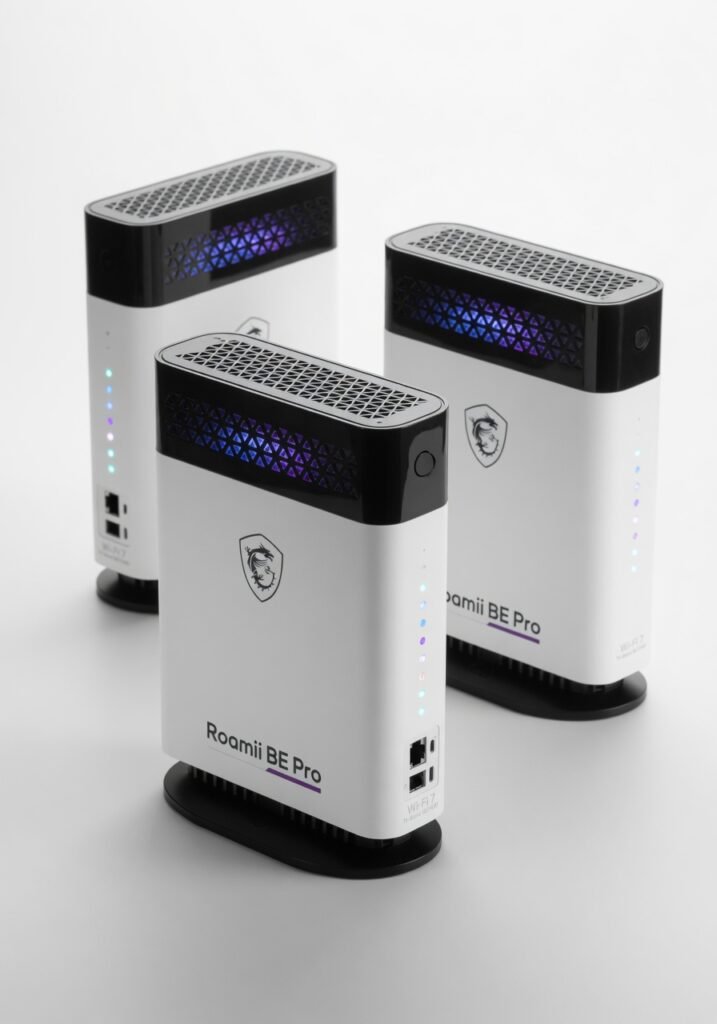
The Roamii BE Pro satellites are functional but uninspired. Each unit is a tall, angular tower with a matte plastic finish that collects dust and fingerprints with equal enthusiasm. The front panel has a subtle MSI dragon logo that glows white when the connection is solid a nice touch for a gaming-adjacent brand. The rear panel houses four 2.5 Gigabit Ethernet ports per node, which is a serious advantage over many competitors that offer only one or two. The ports are clearly labeled and spaced well, but the lack of a 10 GbE port on the main router feels like a missed opportunity for a system this capable. In daily use, the design reveals a practical issue: the venting pattern on the top allows dust to settle inside the unit. Placed on a shelf in a living room, the satellites stayed cool, but after a month, I noticed a thin layer of debris inside the grille. It is not a deal-breaker, but it means regular cleaning. A more enclosed architecture would have been preferable for long-term reliability.
Performance
This is where the Roamii BE Pro earns its keep. In a 2,500-square-foot, two-story home, I tested the system with a mix of clients: a desktop with a Wi-Fi 7 PCIe adapter, a laptop with Wi-Fi 6E, and several smartphones on Wi-Fi 6. Using a wired backhaul connection between the two nodes, the throughput on the 6 GHz band peaked at over 3.2 Gbps at close range enough to saturate a 2.5 GbE connection. At 30 feet through two walls, that number dropped to about 1.4 Gbps, which still beats any Wi-Fi 6 system I have tested. Latency is the real headline. Under heavy load four simultaneous 4K streams and a Steam download the average latency on the 5 GHz band stayed under 6 milliseconds. The multi-link operation (MLO) feature in Wi-Fi 7 allows the Roamii BE Pro to aggregate bands dynamically, which smoothed out the jitter I often see on older mesh systems. In a real-world test, I played a competitive shooter on a Wi-Fi 7 client while four other devices streamed video. The ping never spiked above 14 ms. The biggest surprise was the stability of the 6 GHz backhaul. Without a wired connection, the dedicated wireless backhaul on the 6 GHz band delivered 2.1 Gbps between nodes at the same range. That is competitive with TP-Link s Deco BE95 but at a significantly lower price. Compared to the Netgear Orbi 970, the MSI system falls slightly behind in peak throughput but matches it in real-world stability a result of a cleaner encryption handoff and better beamforming.
Features
The Roamii BE Pro includes Multi-Link Operation (MLO), which allows a single client to connect to multiple bands simultaneously for improved speed and reliability. This works seamlessly with compatible Wi-Fi 7 adapters like the Intel BE200, but older clients see no benefit. The four 2.5 GbE ports per node are a standout feature, letting you wire up a NAS, a gaming PC, and a media server without a separate switch. The mobile app is functional, offering network monitoring, band steering, and QoS settings, but it lacks the advanced traffic shaping found in Asus s AiMesh system. One feature the manufacturer downplays is the automatic channel selection on the 6 GHz band. In a dense urban environment, the system scanned and selected the least congested channel within seconds of power-up. This dramatically reduced interference from neighboring networks, which is a common pain point with early Wi-Fi 6E gear.
Value for Money
At around $550 for a two-pack, the MSI Roamii BE Pro undercuts the Netgear Orbi 970 by over $300 while delivering about 85% of its peak performance. The TP-Link Deco BE95 sits at a similar price but offers only two 2.5 GbE ports per node versus four on the MSI. If you need multiple wired connections at each node, the Roamii BE Pro is a clear winner. The value proposition is strong for anyone with a multi-gig internet connection or a local NAS that pushes data above 1 Gbps.
Compared to Rivals
Compared to the Netgear Orbi 970, the MSI Roamii BE Pro wins on port density and price but loses on peak throughput and build quality. The Orbi 970 can hit 4 Gbps in ideal conditions, but you pay a premium for that marginal gain. Against the TP-Link Deco BE95, the MSI system offers double the wired ports per node and comparable wireless performance. The Deco BE95 has a better app and slightly better mesh roaming, but the gap is narrow. If ports matter more than app polish, the Roamii BE Pro is the better buy.
Who Should Buy It
Buy if: You have a multi-gig internet plan and need to distribute that bandwidth to multiple wired devices. You want to future-proof your home network for Wi-Fi 7 clients without spending flagship money. You run a NAS or home server that benefits from 2.5 GbE connections at every mesh node. Skip if: You live in a small apartment where a single high-end router will cover everything. The mesh system is overkill and you could save money with a single unit. You need a metal chassis or premium aesthetics the plastic construction will feel underwhelming in a visible area.
Final Verdict
The MSI Roamii BE Pro is a performance leader in the mid-range Wi-Fi 7 mesh market. It delivers exceptional throughput, rock-solid latency management, and a port configuration that rivals more expensive systems. The plastic build and lack of a 10 GbE port are genuine compromises, but they do not undermine the core value: this system will handle anything you throw at it today and for the next several years. If you want Wi-Fi 7 without the flagship tax, this is the kit to buy. Check official specifications for the MSI Roamii BE Pro | Learn more about the Wi-Fi 7 protocol on Wikipedia
Where to Buy
You can find the MSI Roamii BE Pro on the official product page.