Apple Unifies iOS 27, macOS, and CarPlay Wallpapers With Golden Gate
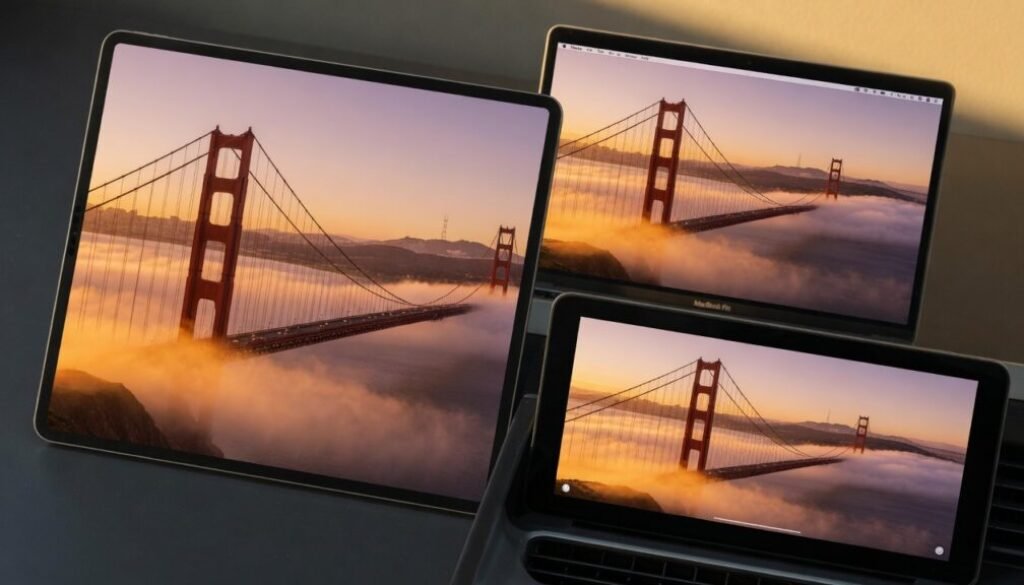
Apple’s stock wallpapers have always been a subtle but telling signature of its operating systems. From the active cosmic swirls of early iOS to the abstract landscapes of macOS, each release carried its own visual identity. The Golden Gate update in iOS 27 and macOS 27 shatters that tradition. For the first time, Apple has deployed a unified wallpaper theme across the entire ecosystem—iOS, macOS, and even CarPlay—using variations of the same core artwork. This marks a significant philosophical shift. Instead of treating each device as a siloed experience, Apple now views the wallpaper as a connective thread. A user moving from an iPhone to a MacBook to a vehicle equipped with CarPlay will encounter a consistent visual language, reinforcing brand cohesion at the most fundamental interaction level: the lock screen and home screen.
The Golden Gate Design Language
The new wallpaper, internally dubbed “Golden Gate,” features a stylized, luminous interpretation of rolling hills or arch-like geological formations bathed in warm, gradient light. While the core composition remains consistent, the execution adapts to the hardware. On macOS 27, the image takes full advantage of the high pixel density of Liquid Retina XDR displays. Gradients are buttery smooth, and the active range stretches from deep, inky shadows in the crevices to brilliant, sunlit peaks. The desktop version remains static but deeply detailed, designed to look immobile on a large screen. On iOS 27, the wallpaper introduces a subtle motion effect. As the user lifts the iPhone or swipes between pages, the light source shifts, creating a parallax illusion that gives the static hills a three-dimensional feel. This uses the gyroscope and accelerometer data to make the lock screen feel alive without draining battery life. The always-on display variant dims the warm tones into a cooler, muted night-time version of the same landscape.
CarPlay Integration
The most surprising recipient of this design philosophy is CarPlay. Traditionally, CarPlay wallpapers were generic, dark gradients designed to minimize driver distraction. With the Golden Gate update, CarPlay now mirrors the same geological theme seen on the phone and desktop. However, the CarPlay version is functionally distinct. The wallpaper is heavily dimmed and blurred to ensure it never competes with navigation prompts or album art. It serves as a faint, familiar backdrop—a visual cue that the in-car interface is an extension of the user’s personal device ecosystem. When a notification appears, the wallpaper subtly recedes further, prioritizing legibility. This approach turns the car dashboard into a true third screen in Apple’s unified hardware lineup.
Why Unify Wallpapers Now?
Apple’s move toward wallpaper uniformity is not merely aesthetic. It reflects a deeper integration strategy tied to continuity features and the “Apple Ecosystem” lock-in. A unified visual anchor aids in the psychological perception of seamlessness. When a user steps out of a car where the dashboard displayed the Golden Gate imagery and unlocks a MacBook showing the same landscape, the transition feels fluid. This consistency reduces cognitive load and strengthens the perception that all devices are part of a single, harmonious system. This strategy also aligns with the hardware design language. Recent Apple silicon Macs and iPhones share a flat-edged, industrial design. The unified wallpaper bridges the software gap that previously existed. It signals that the devices are not just tools but interconnected nodes of a singular computing environment. The wallpaper becomes a brand stamp, much like the startup chime or the logo itself, but far more pervasive because it occupies the visual space constantly.
Technical Execution and Performance
Delivering a high-resolution, multi-layered wallpaper across devices with different screen ratios and color profiles requires precise engineering. The Golden Gate wallpaper is not a single image file stretched to fit. It is a dynamically rendered asset. On devices supporting ProMotion, the wallpaper renders at a native 120Hz refresh rate, ensuring that the motion effects do not stutter. The file architecture uses HEIC formats with embedded depth maps. This allows iOS to separate the foreground hills from the sky background, enabling the parallax effect without requiring raw computational photography processing every time the screen wakes. On older devices, such as the iPhone 15 or M1 MacBooks, the wallpaper gracefully degrades to a static image to preserve performance. This ensures that the unification effort does not come at the cost of battery life or system responsiveness. The wallpaper’s color profile also shifts between P3 wide color and sRGB depending on the display hardware, ensuring the golden hues look correct regardless of the screen generation.
Impact on User Experience and Customization
While the wallpaper is unified, Apple has not entirely stripped away user agency. The Golden Gate theme serves as a default, but it also introduces a new “Color Tint” option. Users can apply a monochromatic filter over the Golden Gate landscape, tinting the hills to match a selected accent color. This bridges the gap between Apple’s desire for uniformity and the user’s desire for personalization. A user can keep the structural design of the new unified theme but tint it neon green or deep blue to match a case or a Focus mode. This customization is synced via iCloud, meaning if a user tints the wallpaper on a foldable iPhone, the same tint applies to the iPad and Mac desktop.
Focus Mode Integration
The unified wallpaper interacts deeply with Focus modes. When a “Work” Focus activates, the Golden Gate wallpaper shifts to a cooler, desaturated palette. For “Sleep” or “Personal” modes, it transitions back to warm, active tones. This visual shift across all screens reinforces the psychological boundary between different contexts, using the same base image as the anchor.
Practical Takeaways for Users
Adopting the new unified wallpaper is straightforward, but maximizing its utility requires a few steps:
- Sync Focus Modes: Ensure iCloud sync for Focus modes is enabled across all devices. This allows the wallpaper tinting to follow the user from iPhone to Mac.
- CarPlay Setup: The CarPlay wallpaper automatically mirrors the connected iPhone’s default wallpaper. No manual configuration is needed, but the phone must be running iOS 27.
- Performance Settings: On Intel-based Macs or older iPhones, consider disabling the parallax motion effect in Accessibility settings to maintain smooth performance.
The Golden Gate update also complements the broader home ecosystem. For users building a smart home hub setup, the visual consistency across the wall panel, phone, and car creates a cohesive “home-to-car” experience that feels less fragmented than previous iterations of Apple’s operating systems.
The Future of Apple’s Visual Identity
The unification of wallpaper signals a broader ambition. Apple is moving toward a visual operating system identity that is hardware agnostic. The wallpaper is the first step; future updates may see unified iconography, consistent notification styling, and identical font rendering across all platforms. This shift also has implications for third-party developers. As Apple tightens the visual parity between platforms, developers will have a more predictable canvas for widgets and live activities. A widget designed for the new macOS wallpaper will look visually coherent on iOS, reducing the need for platform-specific design alterations. The Golden Gate wallpaper is more than a default image. It is a declaration that Apple’s ecosystem is now a single product with multiple screen sizes, rather than a collection of separate devices. The visual glue that holds this ecosystem together is now firmly in place. The approach also reflects an industry trend toward digital wellness and mindful computing. A consistent, calming wallpaper that spans devices can reduce the jarring transition between work and personal contexts. By softening the visual boundaries, Apple encourages a more fluid, less stressful interaction with technology throughout the day.