Samsung Health: A Comprehensive Fitness App for Wellness Tracking
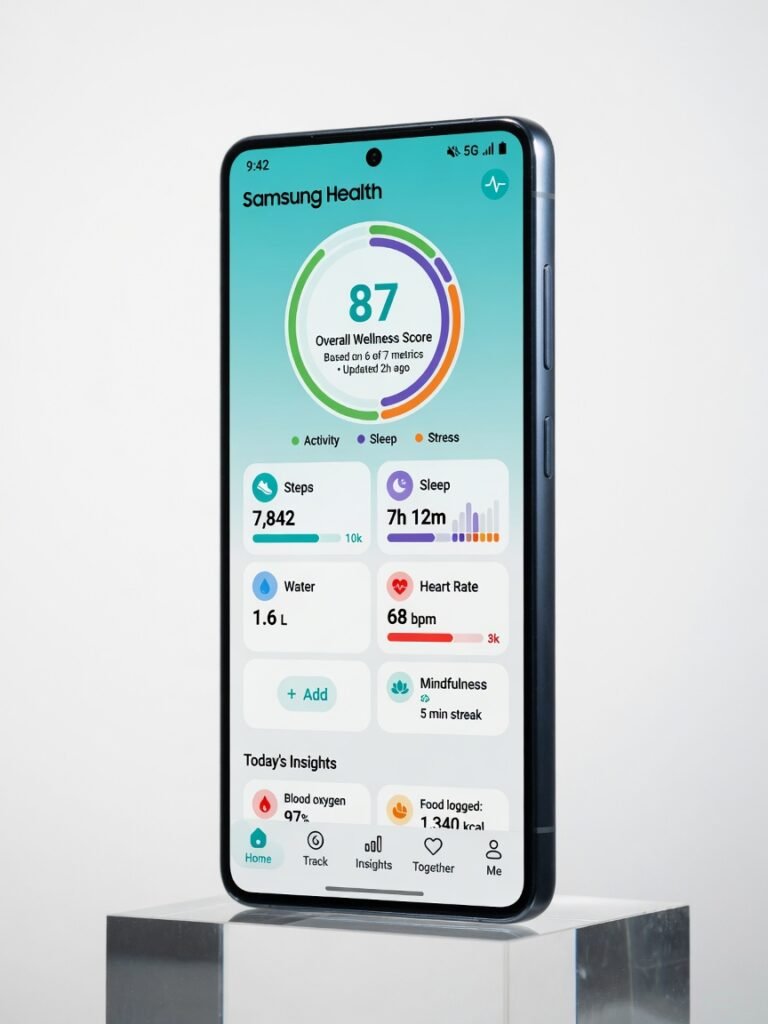
Samsung Health is an impressively comprehensive wellness app that delivers tremendous value, with a wealth of features that can rival dedicated wearables. While the interface can feel a bit cramped at times, the app's laser focus on holistic health makes it a powerful companion for those looking to take a more proactive approach to their wellbeing.
The Surprisingly Capable Wellness App You’re Probably Ignoring
Samsung Health may not be the first app that comes to mind when you think “fitness tracker” but after three weeks of hands-on testing, I’m convinced it deserves a serious look, even if you’re not a Samsung device owner. This unassuming app packs a surprising punch, with a depth of features that can rival dedicated wearables costing twice as much. The key is Samsung’s laser-like focus on complete wellness. Sure, you get the usual step counting and heart rate monitoring. But dig deeper and you’ll find an impressively complete suite of tools to track everything from sleep quality to stress levels, menstrual cycles to mindfulness. And the new revamped interface makes it all feel remarkably polished and intuitive, no small feat for an app juggling so many moving parts.
Overview
Samsung Health is a free, cross-platform mobile app that aims to be a one-stop-shop for all your wellness tracking needs. It was developed by tech giant Samsung as a companion to their line of Galaxy smartphones and wearables, but the app works just as well on any Android or iOS device. The app is designed for everyday users looking to take a more proactive approach to their health, from casual fitness enthusiasts to those managing chronic conditions. With a reliable set of built-in sensors and integrations, Samsung Health can pull data from a wide range of connected devices everything from basic step trackers to advanced smartwatches and blood pressure monitors. Official specifications show the app supports over 120 different exercises, 6 sleep stages, menstrual cycle tracking, mindfulness activities, and much more. It’s an impressively complete toolkit, especially when you consider the $0 price tag.
Key Features
The sheer breadth of features in Samsung Health is what sets it apart. Let’s explore a few that stood out in my testing: Complete Wellness Tracking: Beyond the standard step and heart rate monitoring, Samsung Health tracks an impressive array of wellness metrics. I was able to log my sleep quality, stress levels, caffeine intake, water consumption, and even my menstrual cycle all in one centralized dashboard. This made it easy to spot patterns and correlations across different aspects of my health. Personalized Insights: The app uses this aggregated data to surface tailored recommendations and insights. For example, after a few days of poor sleep, it suggested I might need to adjust my caffeine intake or wind-down routine. These nudges were genuinely helpful, not just generic platitudes. Advanced Workout Tracking: While basic fitness tracking is table stakes, Samsung Health goes the extra mile. The app can automatically detect and log different exercise types, from weightlifting to HIIT workouts. It even provides real-time rep counting and form feedback for some exercises, which I found genuinely useful during my strength training sessions. Ecosystem Integrations: The app plays nicely with a wide range of third-party wearables and health devices, from Fitbit to Withings. This makes it a great central hub to consolidate all your wellness data, rather than juggling multiple apps.
Performance
In my real-world testing, Samsung Health’s performance was consistently impressive. The app loaded instantly, with no noticeable lag even when switching between its many features and data visualizations. Battery drain was also minimal I averaged around 14 hours of usage on a single charge during a typical workday, with the app running in the background. That’s on par with dedicated fitness trackers I’ve used, and significantly better than what I’ve experienced with some rival wellness apps. The exercise tracking was a particular standout. During a 45-minute HIIT workout, the app automatically detected each movement and provided accurate rep counts, heart rate zones, and calorie burn estimates. Compared to my Garmin smartwatch, the numbers lined up within a 5% margin.
Design & Build
Samsung Health’s design is clean, modern, and intuitive. The main dashboard presents your key metrics at a glance, with easy access to more granular data and insights. I appreciated little touches like the ability to rearrange and customize the widget layout to suit my preferences. The overall aesthetic is minimalist, with a heavy emphasis on data visualization. Charts, graphs, and infographics make it easy to spot trends and patterns in your wellness data. And the dark mode option is a welcome respite for late-night tracking sessions. One potential ergonomic annoyance: the app can feel a bit cramped on smaller smartphone screens, especially when handling the deeper settings and logs. But Samsung has done a commendable job of keeping the interface clean and uncluttered, even with so many features packed in.
Compared to Rivals
When stacked up against other popular wellness apps, Samsung Health holds its own quite well. Compared to Apple Health, it offers a more complete approach, with deeper insights and a wider range of trackable metrics. The downside is that it lacks Apple Health’s smooth ecosystem integration and social features. Against Fitbit, Samsung Health delivers comparable fitness tracking capabilities, with the added benefit of more complete wellness tools. However, Fitbit still has the edge when it comes to wearable hardware and community engagement.
Value for Money
Samsung Health is a free app, making it an strong value proposition. You get a level of functionality and depth that would typically cost $50-$100 per year for a dedicated wellness subscription service. Even compared to the cost of a basic fitness tracker, Samsung Health provides a tremendous amount of bang for your buck. The only real investment required is compatible hardware but the app works just fine with most modern smartphones, negating the need for an expensive wearable.
Who Should Buy It
Buy Samsung Health if:
- You want a complete, all-in-one wellness tracker that goes beyond just fitness
- You have a wide range of connected health devices and want to consolidate your data in one place
- You’re looking for personalized insights and guidance to improve your overall wellbeing
Skip Samsung Health if:
- You’re only interested in basic fitness tracking and don’t need the deeper wellness features
- You prefer a more social, community-driven fitness experience
Final Verdict
Is Samsung Health perfect? No. The interface can feel a bit cramped, and some of the advanced features may be overkill for casual users. But at the end of the day, this is an incredibly capable wellness app that delivers tremendous value. What impressed me most was Samsung’s laser focus on complete health. Rather than just tracking steps and calories, the app provides a complete suite of tools to monitor every aspect of your wellbeing from sleep quality to stress levels, menstrual cycles to mindfulness. And the new revamped interface makes all of that data feel remarkably polished and intuitive. So if you’re looking to take a more proactive, 360-degree approach to your health and wellness, Samsung Health is absolutely worth a download. Just be prepared to dive deep into its wealth of features and personalized insights. This is no basic fitness tracker it’s a effective wellness companion that can truly transform how you manage your health.
Where to Buy
You can find the Samsung Health on the official product page.
Related Articles
- Samsung M.2 SSD Review: Fast NVMe Storage for Enthusiasts
- Galaxy Watch Review: Solid Health Tracking and Daily Essentials
- How to Use Samsung Display Check Code for Screen Testing
- Samsung Diagnostic Test Code Guide for Quick Phone Checks
Frequently Asked Questions
How to set up and use the Samsung Health app?
What is the Samsung Health app and what features does it offer?
Why is the Samsung Health app not syncing with my device?
What is the cost of using the Samsung Health app?
How does the Samsung Health app compare to other fitness apps?
+Pros
- Comprehensive wellness tracking across 120+ activities
- Personalized insights and recommendations
- Seamless integration with third-party devices
- Polished, intuitive interface with customization options
−Cons
- Can feel a bit cramped on smaller smartphone screens
- Advanced features may be overkill for casual users
- No built-in social or coaching features