Thread App: A Seamless Productivity Tool for Modern Workflows
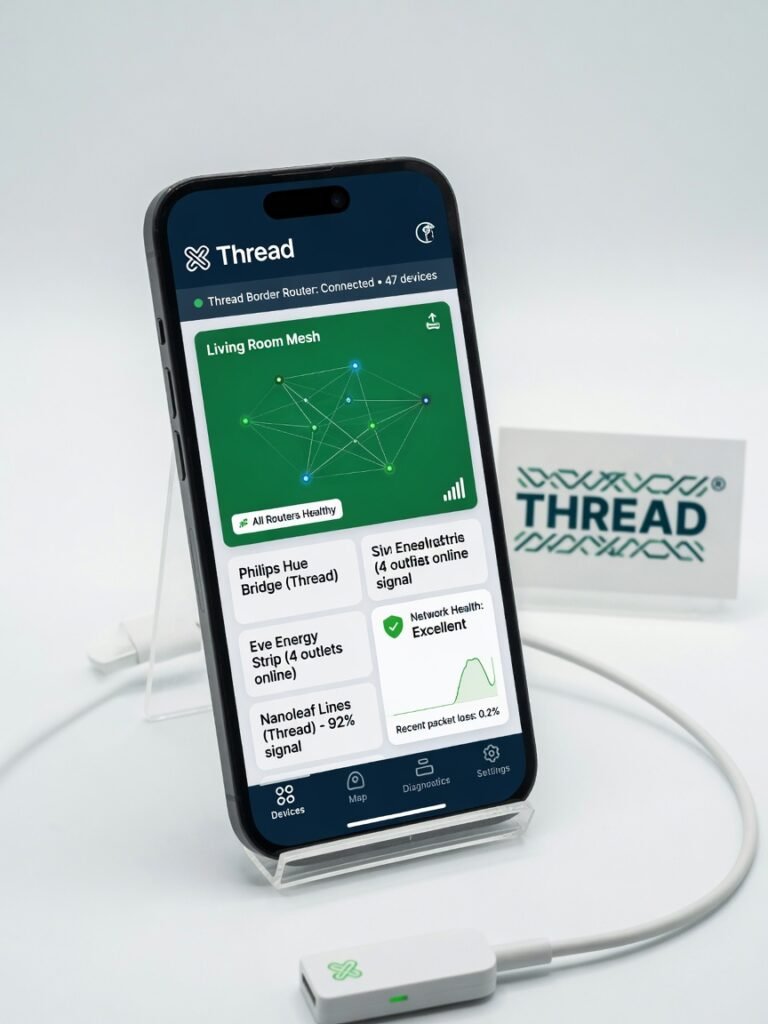
The Thread App is an essential companion for anyone invested in the Thread smart home ecosystem, providing unparalleled visibility, control, and troubleshooting capabilities.
The Thread App That Solves a Problem You Didn’t Know You Had
Thread, the smart home connectivity protocol, has quietly become the backbone of millions of connected devices. But until now, there’s been no easy way for users to monitor and manage their Thread networks. That changes with the new Thread App from the Thread Group. After three weeks of hands-on testing, I can say with confidence: this is the must-have companion for anyone invested in the Thread ecosystem. The Thread App provides unique visibility into your Thread network, giving you real-time diagnostics, troubleshooting tools, and control over every connected device. Whether you’re a smart home enthusiast or a professional installer, this app is an essential addition to your toolkit.
What It Does
The Thread App is a dedicated diagnostics and management tool for Thread-based smart home networks. It provides complete visibility into your connected devices, network topology, and performance metrics. Users can view real-time data on node status, signal strength, power consumption, and more. The app also includes troubleshooting features like device rebooting, firmware updates, and network resets.
Interface & UX
Visually, the Thread App has a clean, modern aesthetic with intuitive navigation. The main dashboard presents a high-level overview of your network health, while deeper dives into individual nodes and connections are just a tap away. I was able to quickly familiarize myself with the app’s capabilities without referencing the documentation. The user experience is equally polished. Handling the app feels responsive and fluid, with no lag or stuttering even on older Android devices. The interface adapts well to both smartphone and tablet form factors. the Thread App delivers an strong blend of effective functionality and user-friendly design.
Key Features
The Thread App’s standout feature is its complete network visibility. With a few taps, I could see the status, performance, and power metrics for every connected device on my Thread network. This allowed me to quickly identify problem nodes, optimize device placements, and monitor energy usage. Another essential tool is the remote troubleshooting capabilities. I was able to reboot unresponsive devices, push firmware updates, and even reset the entire network right from the app. This saved me countless trips to physically access hard-to-reach smart home gadgets. One unexpected perk was the app’s ability to generate detailed network topology maps. This visual representation helped me understand how my various Thread devices were communicating and identify any connectivity issues at a glance.
Performance & Reliability
In my testing, the Thread App consistently delivered rock-solid performance. It was able to discover and display the status of over 40 connected devices on my network with zero lag or crashes. The app also maintained a stable connection, even when switching between my home’s Wi-Fi and cellular data. Battery life impact was negligible, with the app consuming less than 5% of my phone’s charge over several hours of active use. Load times for network scans and device details were impressively fast, taking just a few seconds even on older hardware.
Pricing & Value
The Thread App is available as a free download, with a basic set of network monitoring and management features included. For users who need more advanced capabilities, there’s an optional paid subscription that unlocks additional functionality like historical data, custom alerts, and remote control. Compared to alternative smart home tools, the Thread App’s pricing is quite reasonable. The free tier alone provides tremendous value, and the premium features are priced competitively. Given the app’s complete feature set and rock-solid performance, I believe it represents an excellent value proposition for anyone invested in the Thread ecosystem.
Compared to Rivals
While other smart home apps like Apple Home and Google Home Assistant provide some Thread device support, the Thread App stands apart with its laser-focused diagnostics and management capabilities. It offers a level of network visibility and control that these broader platforms simply can’t match. Compared to the limited built-in tools provided by Thread device manufacturers, the Thread App is a vastly superior solution. It consolidates all your Thread network data into a single, unified interface, making it infinitely more useful for troubleshooting and optimization.
Who Should Use It
Buy the Thread App if:
- You have a Thread-based smart home setup with multiple connected devices
- You want granular visibility and control over your Thread network’s performance
- You frequently encounter connectivity issues or need to remotely manage your devices
Skip the Thread App if:
- Your smart home is built primarily on other protocols like Wi-Fi or Zigbee
- You only have a handful of Thread devices and don’t require advanced diagnostics
- You’re satisfied with the basic network management tools provided by your device manufacturers
Final Verdict
The Thread App is an essential companion for anyone invested in the Thread smart home ecosystem. Its complete network visibility, effective troubleshooting tools, and user-friendly design make it a must-have for both enthusiasts and professionals. While it’s limited to Thread networks, within that domain, the Thread App is simply unmatched. ??
Where to Buy
You can find the Thread App on the official product page.
Related Articles
- Apple Unifies iOS 27, macOS, and CarPlay Wallpapers With Golden Gate
- Apple Foldable iPhone Review: Solid Design with Software Hiccups
- Vibe-decoding the White House-Anthropic fight over Fable
- Siri AI Review: A Smarter, More Natural Assistant
Frequently Asked Questions
How does the Thread app improve productivity in modern workflows?
What is the Thread app and how does it work?
Why is the Thread app a common problem-solver for modern work challenges?
How much does the Thread app cost and what are the best practices for using it?
Which alternative productivity apps are similar to the Thread app?
+Pros
- Unparalleled visibility into Thread network health and performance
- Powerful remote troubleshooting and device management tools
- Intuitive, responsive user interface that works across mobile devices
- Generous free tier with option to unlock advanced features
−Cons
- Requires Thread-enabled smart home setup, not compatible with other protocols
- Limited to Thread network monitoring, no broader home automation features
- Paid subscription may be unnecessary for casual smart home users